 (866) 93-TEBRA (83272)
Make better decisions with insightful reports
Reporting helps you make better decisions by gaining a clear picture of your financial performance. You can use dozens of standard reports, schedule the delivery of email reports to your physicians, and even use our custom reporting engine to build custom reports and charts. By using our advanced reporting, you can track your performance and make better decisions.
Create and Print Live Reports
Practice-Specific Reports - Kareo offers a comprehensive assortment of reports for your practices. Use key indicators reports to review the key practice metrics. Use accounts receivable reports to monitor the revenue you are owed. Use encounters and charges reports to monitor your billings. Use payments and adjustments reports to review your collections. Use denial management reports to identify data entry errors and missed revenue opportunity. Use patient and scheduling reports to monitor the flow of patients through the practice.
Enterprise-Wide Reports - Kareo's web-based medical billing software also offers an assortment of enterprise-level reporting, allowing you to report across all of the practices and users within your organization. Use company indicators reports to track the relative performance of every practice under your management. Use user productivity reports to monitor the workflow and productivity of users throughout your organization.
Configuration - All of the reports offer rich configuration options. You can report by service date or post date. You can filter, group, and sub-group by various criteria, such as providers, departments, service locations, insurance companies, and more. You can filter by procedure code or range. You can generate reports by charge or payment batch. Finally, you can show columns by month, quarter, and year.
Drill-Downs - A growing number of Kareo reports are cross-linked with each other. You can use hyperlinks to drill-down from summary to detail reports, and to drill-down from detail reports to related records.
Export Reports to Excel or PDF - You can export and save any report to Microsoft Excel or Adobe PDF file formats. This allows you to email reports to your physicians or store them on your own computers.
Security and Permissions - You can provide real-time, unencumbered access to reports for all users in your organization with Kareo's web-based medical billing software. Or, if you prefer, you can use special reporting options to limit the date ranges of reports for certain classes of users, such as physicians, or front-office users. This can be used by a billing office to control access to reports, for example, so that certain users can only view reports for a period after the books are closed on that accounting period.
Scheduled Delivery of Email Reports - You can schedule the automatic delivery of provider performance reports by email on a daily, weekly, or monthly basis. The email reports provide key performance indicators such as patients,charges, payments, A/R balance and more. You can configure the reports to be delivered to many email addresses such as the physician, the office manager, or others.
Build Custom Reports and Charts
You can build custom reports using your data from Kareo's web-based medical billing software and the powerful features of Microsoft Excel 2007. The Kareo Add-In for Microsoft Excel is an extension of the Kareo platform that lets you retrieve data from the Kareo service and use the power of Microsoft Excel to analyze your data and build advanced reports.
Create Custom Data Requests from Kareo - With the Kareo Add-In for Microsoft Excel, you can execute customized data requests from the Kareo service. You start by selecting the type of data to query, such as appointments, charges, patient, providers, transactions, and more. Then, you select fields to return from a list that includes all of the available fields for each type of data. Finally, you can enter query parameters to limit the data returned by date range or other criteria.
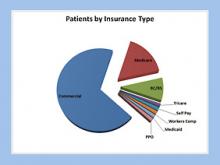
Build Custom Reports and Charts - Once your data is retrieved from Kareo and loaded into Microsoft Excel, you can use your data to meet all of your customized reporting needs. You can filter your data by advanced criteria. You can sort the rows of your data by any field. You can group and subtotal rows by any build. You can build advanced reports using pivot tables. Finally, you can create stunning charts to analyze your data.
Next Feature, Watch a Demo, Read Reviews, or See Pricing & Sign Up


